AI image generation just split into two eras, and the difference decides whether you get a pretty picture or a usable design. The first era cleans noise into pictures. The second sketches the layout first, then renders it. Canva Craft, launched on October 22, 2026, is the first in-house design model built the second way, and it is the clearest sign yet that image AI is growing up from generating pictures to doing design.
This is the full explainer: how diffusion actually works, what planning-first models do differently, twelve years of history in one timeline, and what a picture costs now, from a fraction of a cent to 13 cents. Everything here is built from published documentation, independent testing, and company announcements, with vendor claims labeled as vendor claims.
Diffusion, in plain terms
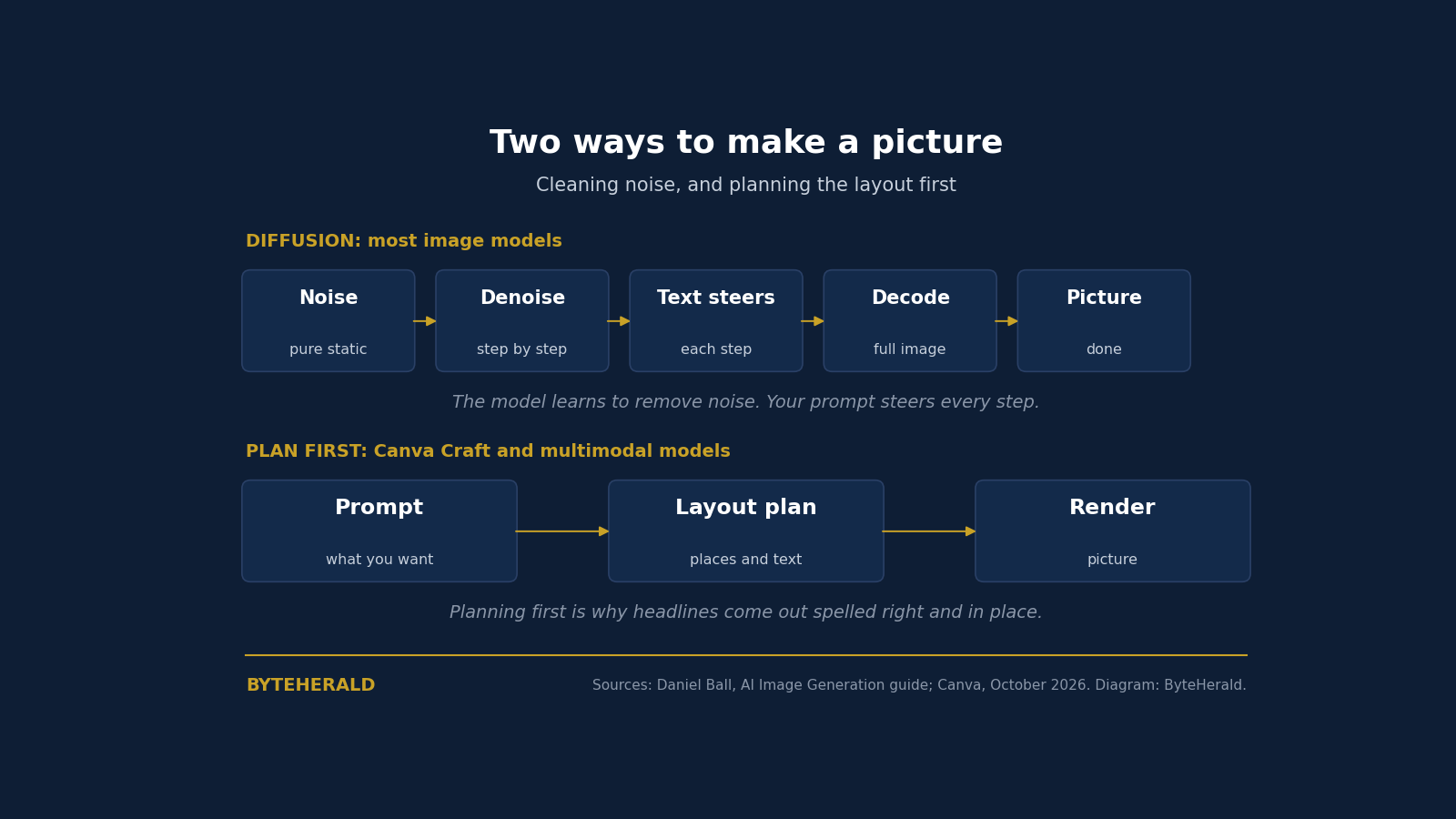
Most image models are diffusion models, and the name describes the whole trick. During training, the model learns to remove noise from images: take a photo, add a little static, teach the model to predict the clean version, and repeat billions of times at every level of noise. To generate, run that process in reverse. Start from pure static and remove a little noise at a time, over a number of steps, while a text encoder turns your prompt into numbers that steer each step toward an image that matches it.
Two details explain most of the surprises. First, diffusion models work in a compressed space: the latent-diffusion approach behind Stable Diffusion paints on an internal canvas about 8 times smaller on each side than the final image, then decodes it. That is why you cannot ask for a tiny image directly; the internal canvas would be 4 by 4 pixels. Second, steps cost time. More steps is slower and usually better, up to a point, and distilled models like Flux Schnell and SDXL Turbo are trained to get a good image in 4 steps instead of 30.
The line between diffusion and chat models is blurrier than the marketing suggests. Modern diffusion models like Flux use transformer blocks that process text and image together, the same building block as a chat model, a lineage we traced in our visual explainer on how transformers work. The useful distinction is not the maths. It is how deeply the image model understands language, because that is what gives you instruction following, readable text, and editing.
The second era: models that plan first
The newer approach puts image generation inside a model that also understands language. Because the same model reads your prompt and makes the picture, these multimodal models follow instructions better, render text you can read, and edit an image you give them. GPT Image, Google's Gemini image models, and Meta's Muse work this way. Some reason about the layout before they draw, and that planning step is the whole ballgame for design work.
Canva Craft is the purest expression of it so far. The model splits the job in two. First, a planning model reads the prompt and writes a detailed plan: which elements appear, where they sit relative to each other, their relative size, what matters most, and any text that has to appear. Second, a rendering model turns that plan into an image at up to 2K resolution, in more than 30 aspect ratios. Canva says planning first gives legible text, objects placed where you asked, and edits to one element without redrawing everything else. Craft can write text into images in 55 languages, and its output feeds Magic Layers, which turns a flat image into separate editable design elements.
Craft comes from Canva Research, the company's in-house lab, built and trained from scratch on millions of human-created Canva templates: posters, social posts, presentations, menus, infographics, and typography-heavy designs, rather than mainly on photographs. That training choice is the thesis: layouts are learned from layouts, not from photos. Canva claims Craft ranks first globally for People and Portraits (of 87 models) and for Landscapes and Nature (of 85) on DesignArena's leaderboard, and second overall among image labs behind OpenAI. Those are company-reported rankings, not independent benchmarks, and they should be read that way. Craft launched on October 22, 2026, inside Dream Lab for all users and through Canva's public API, with cheaper Craft-fast and Craft-ultrafast versions coming soon. Until now Canva had rented its image AI: Dream Lab launched in October 2024 running on Phoenix, from Leonardo.ai, the Sydney startup Canva bought that year.
Twelve years in one timeline
| Year | What happened | Why it mattered |
|---|---|---|
| 2014 | GANs: Goodfellow's generative adversarial networks | Two networks, one making images and one spotting fakes; convincing faces, hard to steer with text |
| 2018 | Edmond de Belamy sells at Christie's for $432,500 | AI art goes to auction at more than 40 times its estimate |
| 2021 | OpenAI's DALL-E links text and images | Type a sentence, get a picture, even a small blurry one |
| 2022 | DALL-E 2, Midjourney, Stable Diffusion arrive within months | The breakout year; open-source Stable Diffusion runs on a gaming PC with about 7GB of video memory |
| 2023 | Photorealism and readable text arrive | The Pope puffer-jacket image fools the internet; Ideogram makes text legible; DALL-E 3 moves into ChatGPT |
| 2024 | Flux launches; AI posters become a byword for cutting corners | Former Stable Diffusion researchers set the open-weight default; backlash grows |
| 2025 | Native image models: GPT-4o images, Nano Banana | Image generation moves inside the chat model; Gemini 2.5 Flash Image edits for $0.039 |
| 2026 | DALL-E leaves the API; 60-plus models on OpenRouter; Canva Craft | Abundance and churn: older models retire every few months, and design-first models arrive |
The old tells are gone, and that matters for readers. Counting fingers and reading background signs worked until about 2023. Midjourney v5 fixed most hands, and character-aware modeling fixed most text. The giveaway now is taste: too much glow, too much drama, nothing allowed to be plain. In one independent tester's experiments, the poster that passed a casual glance was the deliberately boring one: a pristine scan, a flat red background, plain heavy italic type, competent and slightly bland.
What a picture costs now
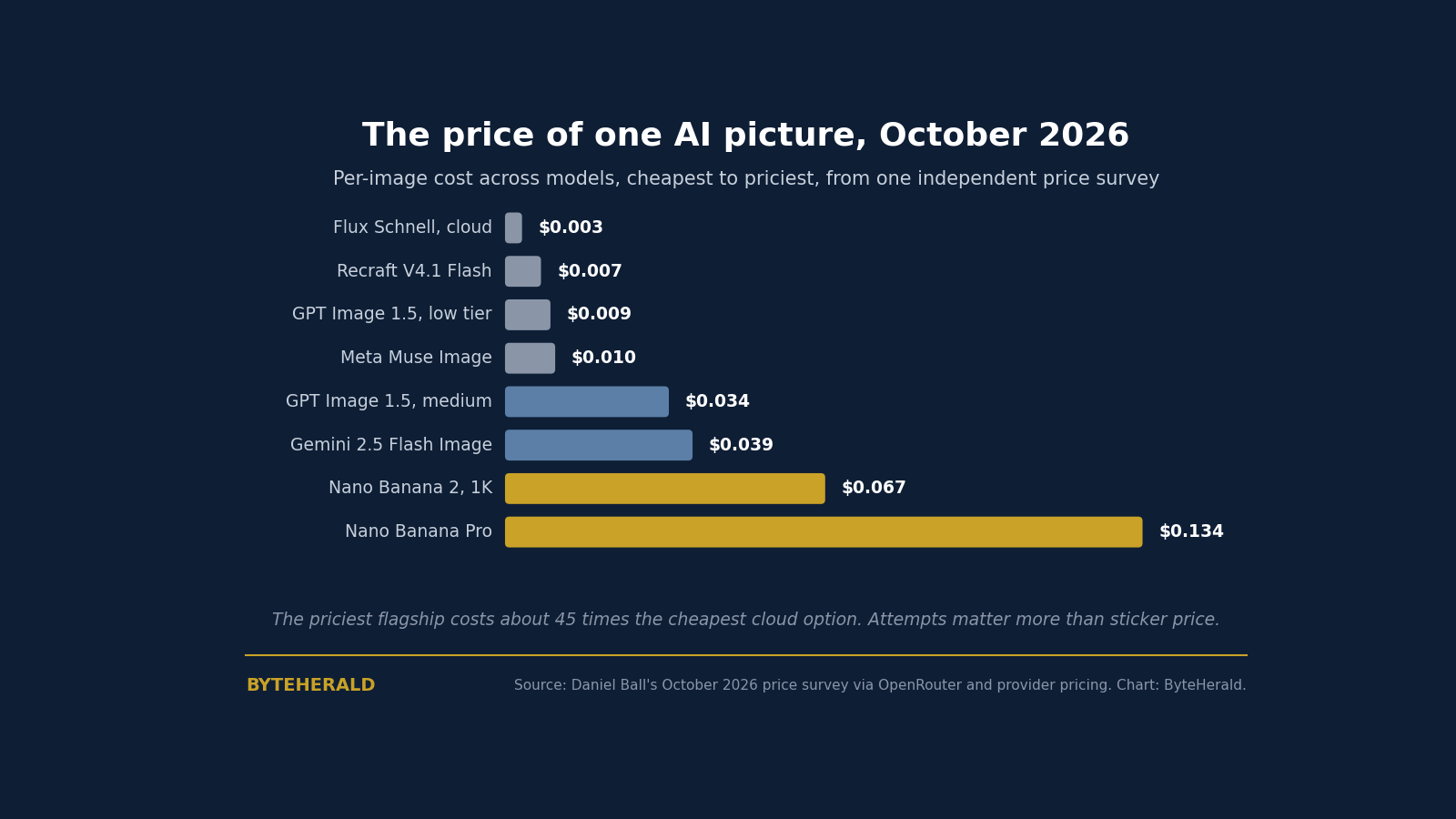
The most useful mental model is a painter who only owns large canvases and charges per canvas. A flat blue sky costs the same as a detailed oil painting of the same size, because the model does the same work across the whole image. That is why simple pictures are not cheaper, and why asking for a smaller size often does not help: Gemini 2.5 Flash Image returned 1024 by 1024 when asked for 512 by 512, at the same flat price.
| Option, October 2026 | Cost per image | Good for |
|---|---|---|
| Local Flux Schnell | $0, plus your time | Prompt iteration and bulk batches |
| Flux Schnell on Replicate or fal.ai | About $0.003 | Cheap cloud batches |
| Recraft V4.1 Flash (OpenRouter) | About $0.007 | Fast, cheap illustration |
| GPT Image 1.5 | $0.009 low, $0.034 medium, $0.133 high | Quality tiers from OpenAI |
| Gemini 2.5 Flash Image | About $0.039, half via Batch API | Edits and character consistency |
| Nano Banana 2 (Gemini 3.1 Flash Image) | About $0.045 at 0.5K, $0.067 at 1K | Newer and better, but pricier |
| Nano Banana Pro (Gemini 3 Pro Image) | About $0.134 and up | Final, hero quality |
Price per image is misleading on its own. The honest formula is cost per usable image equals price per image times attempts needed, plus your time. A free local model that needs ten tries can lose to a $0.039 model that gets it right first time. The same tester found the sweet spot for bulk icon work almost absurd: asking for 100 fantasy inventory icons returned 156, about 140 of them distinct, for one $0.039 call, about $0.00025 per icon, with ordinary code slicing them afterward. The model is good at what something should look like and bad at putting exactly this in exactly this cell. Use the model for the creative part and code for the structure.
How to tell what you are looking at
| Diffusion models (Flux, SDXL, Imagen) | Multimodal models (GPT Image, Gemini, Muse) | |
|---|---|---|
| What drives cost | Resolution and number of steps | Image tokens, usually fixed per size and quality tier |
| Strengths | Cheap, fast, runs locally, seeds give repeatable results | Follows instructions, renders text, edits from a reference image |
| Weaknesses | Takes prompts more literally | Often no seed control and a fixed output size |
| Open weights? | Often | Rarely |
Provenance is the other half of literacy. OpenAI adds C2PA metadata and a SynthID watermark to its images, and Google adds SynthID to Gemini images. Metadata is easily stripped, and watermarks survive screenshots better, but neither proves an image is or is not AI-made on its own. The full technical story, including where detection breaks, is in our watermarking explainer. The short version: treat every provenance signal as a clue, never as proof.
What to use for what
| Job | Use this | Watch out for |
|---|---|---|
| One-off image or quick edit | Chat apps: ChatGPT, Gemini | Little control, usage limits |
| Repeatable or production images | Direct APIs: OpenAI, Gemini, Vertex | Each API is different; hide them behind one interface |
| Polished design work | Creative tools: Midjourney, Firefly, Canva Craft | Subscriptions, hard to automate |
| Trying many models with one key | Aggregators: OpenRouter, Replicate, fal.ai | Markup on some; models come and go |
| Free bulk generation, full control | Local Flux or SDXL with ComfyUI | Needs a decent GPU or Apple Silicon; slower |
Three rules survive every experiment in the guide. Describe how the image was made, not how it should look: camera position, lens, film stock, print process, and scanning give the model concrete constraints, while "stunning" and "hyper-detailed" push it straight into the AI look. Keep text short and exact, in quotes, with an instruction to spell every word as written, and proofread the result. And expect the ground to move: models retire with weeks of notice and providers quietly ignore parameters, so keep the model in config and log what you actually got back.
The direction is clear even through the churn. Image models started as picture generators, became editors, and are now becoming designers: systems that plan a layout, respect it, and hand back something you can actually publish and edit. The pretty picture was the demo. The plan is the product.
By ByteHerald Staff. Daniel Ball published his practical guide to AI image generation in October 2026, covering diffusion and multimodal models, the 2014 to 2026 history, and an October 2026 price survey across OpenRouter and provider pricing. Canva announced Craft, its first in-house image model, on October 22, 2026, as reported by TechCrunch and Digital Trends, with plan-first generation at up to 2K resolution in more than 30 aspect ratios. OpenAI removed DALL-E 2 and 3 from its API on May 12, 2026, according to the guide's documentation review.
Comments
Post a Comment