OpenAI gave ChatGPT a body today, and it lives in your browser. In a series of announcements on October 15, the company rolled out tab-aware ChatGPT for Chrome: tag @Chrome in chat and it reads across your open tabs to compare, draft, and fill; switch to work mode and it takes the controls, sending messages, filling forms, downloading files, organizing tabs in the background; and a new side-chat panel keeps the full conversation beside whatever page you are on. The feature runs on OpenAI's own Chrome extension, which already has 7 million users, and it is available on all ChatGPT plans, not gated to the top tier.
What it can actually do
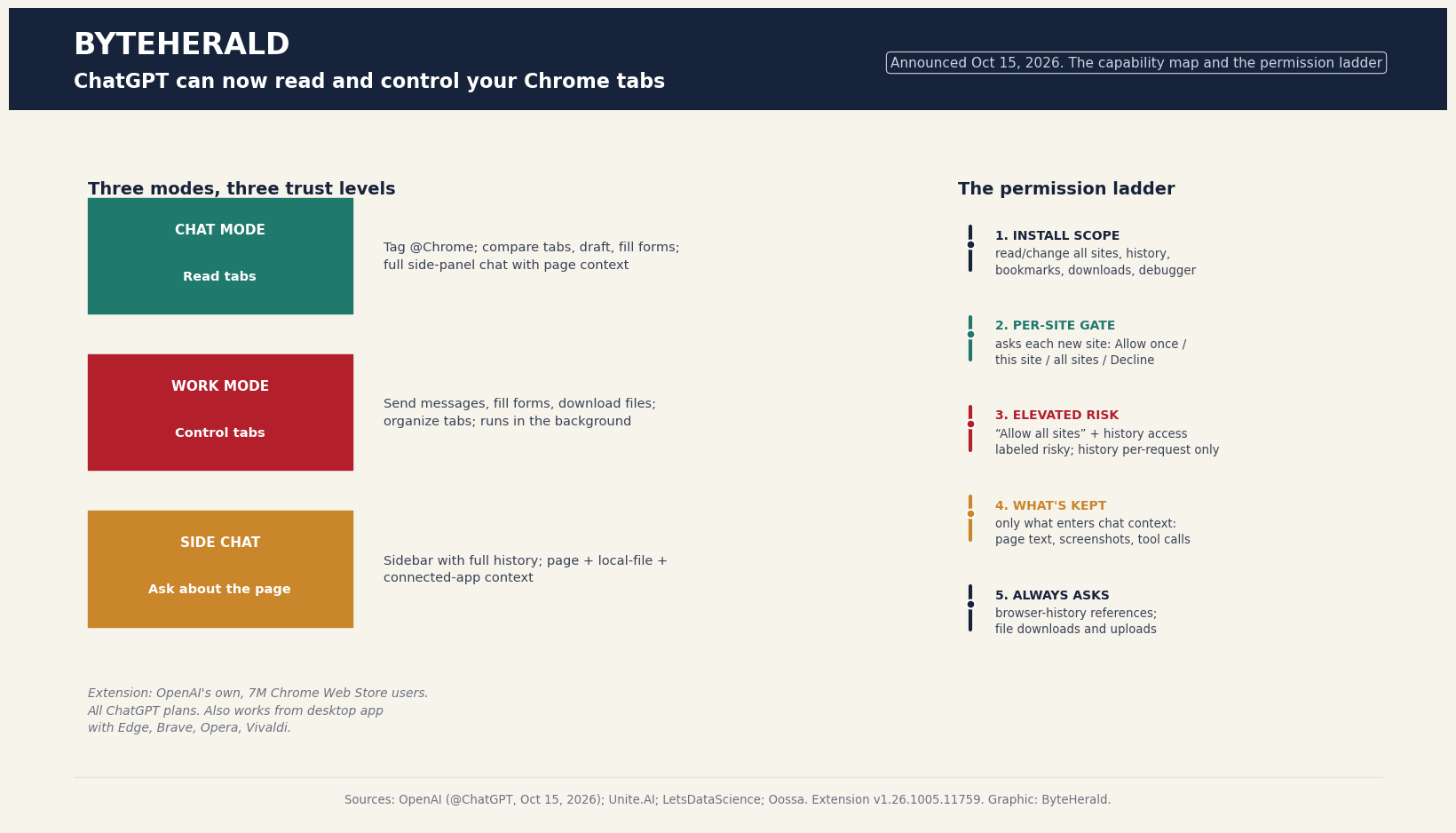
The launch is really three products sharing one extension. Chat mode is the reader: mention Chrome and ChatGPT gathers information across open tabs, OpenAI's own examples include comparing three sofa tabs by dimensions, material, delivery and returns, or moving vendors into a comparison sheet with pricing, features and source links. Work mode is the doer: it can control tabs, send messages, fill out forms and download files, and it works in the background without taking over the browsing session. Side chat is the companion: a sidebar with the model's full power and entire conversation history, asking about the active page or continuing tasks with page, local-file and connected-app context. Notably, this is not Chrome-only, the desktop app drives Chrome, Edge, Brave, Opera and Vivaldi, with side chat everywhere except Opera. The same day's launch sits inside a bigger pattern we have been tracking: Google's Universal Cart went live this morning, and the browser is rapidly becoming the place where agents shop, book and fill forms for you.
The permission ladder
The interesting part of this launch is not the capability, it is the consent design. ChatGPT asks before interacting with each new website, with four choices: allow once, allow for this site, allow for all sites, or decline, and allowlists and blocklists carry across browsers. OpenAI labels "allow for all sites" and browser-history access as Elevated Risk; history access is scoped per request with no always-allow option at all. The extension always asks before referencing browser history or downloading and uploading files. On retention, OpenAI says it keeps no separate complete record of browser actions, it stores only what becomes part of ChatGPT context: page text it read, screenshots, tool calls, summaries and messages. That is a genuinely thoughtful design: the riskiest grants are named as risky, and the broadest ones require repeating consent. The honest caveat sits at the bottom of the ladder, though: the install-time permission scope can include reading and changing data on all websites, plus browsing history, bookmarks, downloads, tab groups and debugger access. OpenAI's store disclosure says data is not sold to third parties or used for unrelated purposes, but the capability ceiling is maximal, and OpenAI itself warns users to treat page content as untrusted and not to send secrets through browser tasks. That is the assume-breach doctrine applied to your tabs: the model reading your bank tab is exactly as compromised, in principle, as the page it is reading.
Three browsers, three philosophies
OpenAI is not alone in the tab. Microsoft's Edge Copilot Mode offers multi-tab content understanding and Copilot Actions that fill forms and make reservations, gated behind opt-in with on-screen visual cues when active. Perplexity's Comet goes further, a full agentic Chromium browser where the Comet Assistant executes long-running workflows. The philosophies differ: Edge keeps the agent beside the browser with visible cues, Comet replaces the browser with the agent, and ChatGPT's extension turns any Chromium browser into the agent's body while trying to make every grant explicit. The comparison that matters for readers: Comet asks you to live inside its browser; ChatGPT asks for the keys to the browser you already live in. The second request is bigger, which is why the permission ladder deserves the scrutiny, and why "Elevated Risk" being a first-class label, rather than fine print, is the detail other vendors should copy.
ByteHerald's reading
Two things are true at once. This is the most important consumer AI-agent launch of the month, tab access turns ChatGPT from a chatbot into something that does the clicking, and the sample tasks (compare vendors, fill the dentist form, add the appointment to the calendar) are the first agent demos that read like real errands instead of party tricks. And it is the largest permission grant most users will ever hand an AI company: read-and-change on all sites plus debugger access is, functionally, the ability to be you on the internet. The permission ladder is good design, but design is not a substitute for judgment, set per-site allows, decline the rest, and treat "allow for all sites" the way the label says: elevated risk. The agent era's first rule is the oldest one in security: least privilege.
By ByteHerald Staff. Feature details compiled from OpenAI's October 15 announcements and independent technical coverage (Unite.AI, LetsDataScience, Oossa); menu and label names are brief excerpts. Availability and permissions as announced; check the live extension listing before installing. Capability graphic is ByteHerald's original compilation.
Comments
Post a Comment