OpenAI announced on October 27, 2026, that iCloud Mail and Calendar plugins are now available in ChatGPT on all plans, on the web, desktop, and iOS. Mail can search and read mail, manage messages and drafts, send email, and look up contacts. Calendar can read, create, and update events and look up contacts. Neither plugin reaches Gmail, Outlook, or any other non-iCloud account that happens to sit inside Apple's Mail app, and that boundary is the most important detail in the announcement.
What each plugin actually does
The two plugins are separate connections, and that separation is a feature, not a quirk. Connect Calendar alone and ChatGPT can see your schedule without touching your inbox. Connect Mail alone and it can search your messages without editing your calendar. The practical use case OpenAI pitches is the joined-up one: ask ChatGPT to find a confirmation email, check whether it clashes with anything on your calendar, and help reschedule if needed. That only works when both plugins are connected, and it is the first time ChatGPT's proactive agent, Dots, can use iCloud data at all, according to reporting on the launch. Dots access is limited to Pro plan users, so free and standard users get the plugins in conversation but not the always-on agent watching for them.
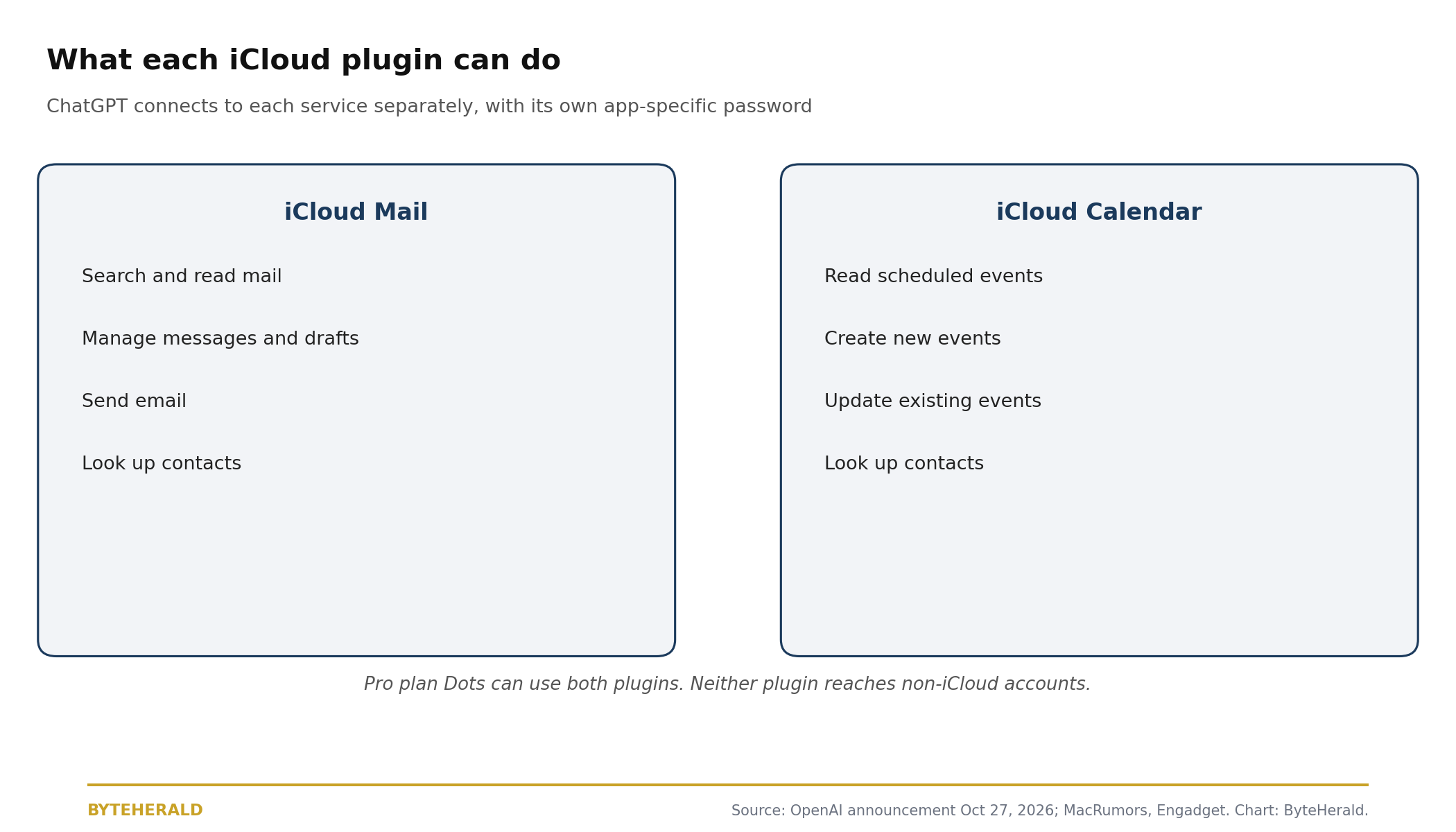
| Capability | iCloud Mail | iCloud Calendar |
|---|---|---|
| Search and read | Yes, messages | Yes, events |
| Create or send | Yes, send email and drafts | Yes, create events |
| Change existing items | Yes, manage messages | Yes, update events |
| Contact lookup | Yes | Yes |
| Non-iCloud accounts | No | No |
| Dots agent access | Pro plan only | Pro plan only |
The setup trap: two passwords, two addresses
Setup is where most users will stumble, and it is also where the privacy design is clearest. Each plugin requires signing in with an app-specific password, the kind Apple issues for third-party mail and calendar apps, rather than a normal Apple Account sign-in. That is good practice, because an app-specific password can be revoked on its own without changing the main account password, and it is also a reason to pause: you are handing a chatbot a credential that can read and, in Calendar's case, change your schedule. The second trap is addresses. Reporting on the launch notes that iCloud Mail takes an address ending in icloud.com, me.com, or mac.com, while iCloud Calendar takes the primary Apple Account email address, which can be a different address entirely. Fill in the wrong one and the connection fails for a reason that looks like a bug. The fix is to treat the two plugins as two separate apps, each with its own password and its own address, and to revoke either one the moment you stop using it.
Why OpenAI went around Apple
This launch is best read as OpenAI building its own bridge to Apple users instead of waiting for Apple's. Siri gained a ChatGPT extension in iOS 18.2, letting Siri hand off harder queries to ChatGPT with user approval, but OpenAI later described that extension as persistently underperforming in court filings reported in September 2026. A plugin is the opposite approach: instead of Apple handing a query to OpenAI, OpenAI connects directly to the user's iCloud data with the user's own credential. That gives ChatGPT some of the same personal-data access that Siri AI has, and it makes ChatGPT more useful on Apple platforms without Apple building anything new. The trade is obvious and should be stated plainly: the user gains a chatbot that can act on their inbox and calendar, and OpenAI gains a position inside the daily workflow of iPhone, iPad, and Mac users that no App Store rule can easily remove.
Mail and calendar are stronger powers than browser tabs
Readers who followed ByteHerald's earlier coverage will recognize the pattern, and the difference matters. In ChatGPT Can Now Read Your Chrome Tabs, the power was observation: ChatGPT could see what was open in the browser, under a permission model that asked per site. The iCloud plugins go further, because they include write powers. Calendar can move a meeting. Mail can send a message. A chatbot that misreads a confirmation email can therefore create a real calendar error or send a real reply, not just show a wrong summary. That is why the per-plugin switch matters more here than in the browser case: connect the plugin whose write power you actually want, test it with a low-stakes event or a draft first, and keep Dots, the proactive agent, off unless you want an agent acting while you are not watching. The same logic applies to any agent that can act on money rather than only read: a calendar edit and a purchase are both actions that are hard to undo cleanly, so write powers deserve tighter rules than read powers.
What to check before you connect
Four checks cover most of the risk. First, confirm you actually use iCloud Mail or iCloud Calendar, because users whose mail lives in Gmail get nothing from these plugins even if Gmail appears in Apple's Mail app. Second, create a separate app-specific password for each plugin and store it where you can revoke it, not in a chat transcript. Third, try the joined-up task on a test event before trusting it with a real meeting, and read the draft before any email goes out. Fourth, decide about Dots separately from the plugins: a Pro user who connects Mail for occasional searches has not thereby agreed that an agent should monitor the inbox continuously. None of these checks require trusting OpenAI's description of the feature. They are the same checks any careful user would apply to any app that asks for mail and calendar access, and they remain valid even if the launch proves popular.
By ByteHerald Staff. OpenAI, via its ChatGPT account on October 27, 2026, announced that iCloud Mail and Calendar plugins are available in ChatGPT, that users can ask ChatGPT to find email, catch up on an inbox, check what is next, or update a calendar event, and that the plugins are available on all ChatGPT plans on web, desktop, and iOS. MacRumors, October 27, 2026, reported that the Calendar integration can read, schedule, and update events, that Mail can search and read mail, manage messages and drafts, send email, and look up contacts, and that each plugin requires an app-specific password. Engadget, October 27, 2026, reported that the plugins work like the existing Gmail and Google Calendar plugins, that Pro plan Dots can use either plugin, and that the plugins only reach Apple's own mail and calendar services. MacRumors, September 23, 2026, reported OpenAI's court filing describing the Siri ChatGPT extension as persistently underperforming.
Comments
Post a Comment