Google has brought computer use to its Gemini desktop app on macOS, TechCrunch reported on November 19, 2026. Gemini can now work through multi-step tasks across native Mac apps, local files, and websites in a background window, while the user keeps typing. The feature is limited to paid subscribers in the United States, and it only runs on Apple silicon Macs.
What Gemini can do on your Mac
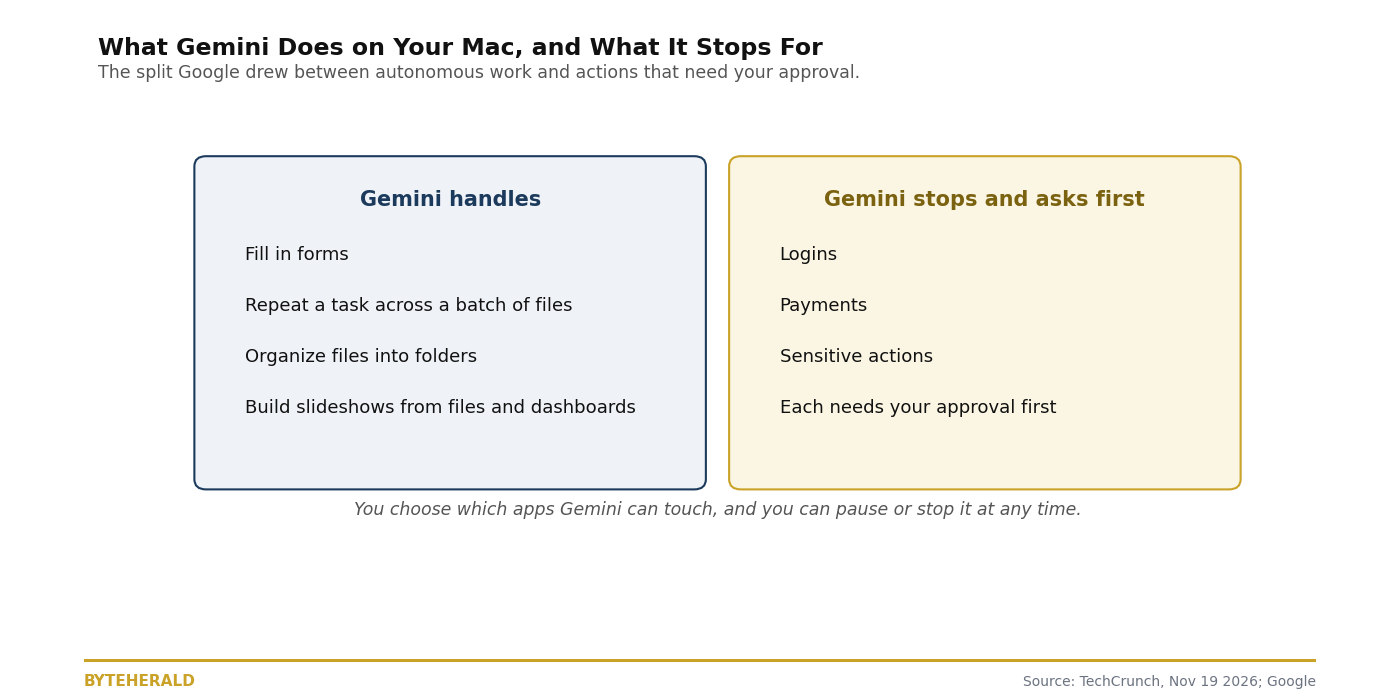
Computer use is the agentic step beyond chat: instead of answering a question, the AI takes actions directly on the computer. In Gemini's case, that means navigating native Mac apps and browsing websites in the background, working through local files as well as the web. Google suggests the feature for tedious, repeatable work: filling out forms, repeating the same task across a batch of files, organizing files into folders based on specific criteria, and creating slideshows from files or information in online dashboards.
The user watches the agent work in a live preview inside the chat, while their own screen and cursor stay free to continue other work. Users can pause, stop, and approve Gemini's actions before they happen. That preview is the main safety control Google offers at launch, and it is the feature to judge first: a background window you can watch is very different from an agent that works invisibly.
The eligibility checklist
Most Mac users cannot use this yet, and the conditions are specific enough to check one by one. All of them must hold at the same time.
| Requirement | What it means |
|---|---|
| Apple silicon Mac | Intel Macs are excluded |
| macOS Sequoia 15.0 or later | Older macOS versions are excluded |
| English, United States only | Other languages and countries wait; Google gave no timeline |
| Personal Google account | Work accounts are not covered at launch |
| Age 18 or over | Younger users are excluded |
| Google AI Plus, Pro, or Ultra subscription | The free tier does not get computer use |
The paid-plan requirement is the part worth pausing on. Computer use is not a free-tier feature, and Google puts it behind all three paid plans, so the cheapest entry point is AI Plus rather than the top tier. Google has not said when the feature will expand to other markets, platforms, or the free tier.
What it stops for
Google drew a line between work Gemini does on its own and actions it must ask about. Logins and payments pause by default, with confirmation required for sensitive actions. Users choose which apps Gemini can touch, and per-app access control decides how far it can reach.
The audit question is what "can reach" means in practice. AppleInsider warned that Gemini can reach signed-in app sessions and multifactor codes on screen, which is exactly the access a computer-use agent needs to do its job and exactly the access that makes a mistake expensive. The isolated background window and the live preview are real controls, but they depend on the user watching. An agent that can see a multifactor code can also, in principle, use it, and the approval step is the only thing standing between the two.
The same day, the same battlefield
Gemini's Mac launch arrived on the same day Apple confirmed it is building its own AI agent, and the two stories belong together. Apple is building an agent that can use a computer the way a person does, while tightening the screws on rival agents: in the macOS 27.3 beta, enabling a third-party computer-use agent now takes 14 steps, up from four. Google shipped first on Apple's own platform, behind a paywall, while Apple is still hiring. The scoreboard for this field already exists: we rank who can actually operate a computer in The Computer-Use Scoreboard: Who Can Operate Your PC, and Gemini's computer use is the newest entry to judge against it. Apple's own agent is still hiring, with a launch eyed as soon as late 2027, even as Apple tightens the screws on rival agents in macOS 27.3.
Google is also, by TechCrunch's own account, a little late to the game: OpenAI, Anthropic, and Meta have already been offering agentic features in their desktop applications for some time. Google only this week widened access to Gemini's Tasks, the in-app feature that signs into websites, makes purchases, and books appointments, and it only recently began admitting early testers to its revamped CC agent for families. Computer use is the third leg of that catch-up, and the paid-plan gate is how Google is charging for it.
Is it worth a paid plan
It depends on the job. If your work is batch form-filling, organizing files by rule, or turning dashboard numbers into slides, this is the first Google agent that does the clicking for you, and the live preview plus the approval step make it the most watchable of the current computer-use options. If you are on the free tier, outside the United States, on Windows, or on a work account, there is nothing to buy your way into yet, and the honest move is to wait for the expansion Google has not dated.
The question to ask before turning it on is the same one that applies to every computer-use agent: which apps will you let it touch, and will you actually watch the preview? The feature is only as safe as the approvals you give it, and the approval screen is where the safety lives.
By ByteHerald Staff. TechCrunch reported on November 19, 2026, that Google brought computer use to the Gemini desktop app on macOS, allowing the AI to complete multi-step tasks across native Mac apps, local files, and websites in the background, with a live preview in the chat and pause, stop, and approval controls, and that the feature requires the Gemini app for Mac and a Google AI Plus, Pro, or Ultra subscription in English in the United States, with no expansion timeline given. AIWeekly reported on November 19, 2026, that the agent runs in an isolated background window, that logins and payments pause by default, and that the launch requires an Apple silicon Mac on macOS Sequoia 15.0 or later, a personal Google account, and a user aged 18 or over. AppleInsider warned on November 19, 2026, that Gemini can reach signed-in app sessions and multifactor codes on screen.
Comments
Post a Comment